![logo-alt.svg]](https://www.igoclients.com/hubfs/logo-alt.svg)
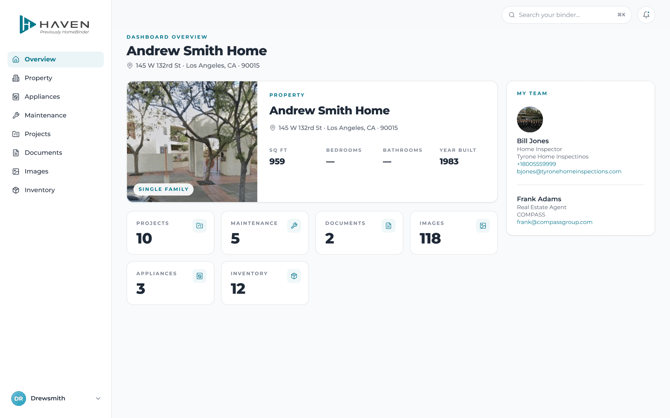
Haven Dashboard overview
OverviewOverview is the main page of your Haven Dashboard. It gives you a quick view of your property and the information connected to your home.
You may also see My Team here, which shows professionals connected with your home, such as your home inspector or real estate agent.
Select Overview at any time to return to your home's main Dashboard page.
PropertySelect Property to manage information about your home.
Details: View and manage your property information.
Structures: Add and manage structures associated with your property.
Areas: Keep track of the different areas of your home.
Finishes: Save details about finishes used throughout your home.
Paints: Keep paint information, including colors and other details, so you can find it when you need it.
Permits: Keep track of permits associated with your property.
Team: View people connected with your home and save your home pros.
Under Team, Your team shows professionals associated with your home. The Home pros section lets you add and save contact information for professionals who work on your home.

Property > Team: Home pros
AppliancesSelect Appliances to keep important information about the appliances in your home.
You can add details such as the manufacturer and model number for appliance recall alerts. You can also save information such as where the appliance was purchased, the purchase price, and when it was installed.
MaintenanceSelect Maintenance to view and manage maintenance tasks for your home. You can review existing tasks, edit or remove them, and add new maintenance tasks as needed.
ProjectsUse Projects to keep track of renovations, repairs, and other home projects. You can also use this section to plan projects you may want to complete in the future.
DocumentsSelect Documents to store and access documents related to your home, including documents that have already been added for you.
ImagesUse Images to store photos connected to your home and property.
InventorySelect Inventory to keep track of items in your home.
Inventory items can be associated with maintenance items, projects, paints, finishes, and structures. This helps keep related information together as you manage your home.
Need help?If you have trouble finding or updating information in your Dashboard, submit a request here and our team can help.